How to Triage a Reading Backlog You Will Never Finish
Sort saved articles, reports and newsletters by the work they support. Use a small active queue, a worked example and clear rules for keeping or dropping an item.
You do not need to read everything you saved. Start by separating material that supports current work from material you might enjoy or need someday. Then choose a small active queue based on the questions in front of you, not on which tab has been open longest.
This is a practical way to organize a backlog, not a prescription for a perfectly empty library. An archive can remain large. The part you intend to work through next needs to be small enough to make a real choice.
Stop treating “saved” as “promised”
An article can earn a place in your library without earning time this week. Maybe a colleague shared it, the headline looked relevant or you wanted to preserve a source. Those are reasons to keep a reference, not necessarily reasons to read it now.
Review one manageable slice: the current browser window, the last batch of newsletter saves or the materials for one project. Do not migrate your entire library into a new tool before deciding what the backlog is for.
For each item, add a short answer to “What would I use this for?” “Understand the proposed contract’s renewal terms” is actionable. “Useful AI stuff” is a reason to inspect the item further or leave it outside the active queue.
Use four destinations
Read next is for a current question, decision or genuine personal interest you are choosing to spend time on. Give it a specific next session or priority.
Keep as reference is for something you can find when needed: a specification, official guide, research paper or source behind an existing note. It does not need a reading deadline.
Explore later is for curiosity without a current commitment. Keep this separate so it does not compete with a deadline every time you open the list.
Remove from the active queue is for duplicates, obsolete material or an item you no longer want. You can archive it rather than delete it if you need a record. Keep documents required by your organization under its normal retention rules; this exercise is not a reason to remove work records.
A backlog sorted against one real question
Imagine a product manager preparing a decision about a small customer-training pilot. Here is a fictional collection of saved material:
| Saved item | Destination | Reason |
|---|---|---|
| Customer’s current training requirements | Read next | Defines what the pilot must cover |
| Proposed agenda | Read next | Needs comparing with the requirements |
| Official accessibility guidance relevant to the delivery tool | Read next, relevant section only | May change the proposed setup |
| General essay about the future of training | Explore later | Interesting, but not evidence for this pilot |
| Last year’s superseded agenda | Keep as reference if needed | Historical context, not the current plan |
| A second save of the same proposal | Remove from active queue | Adds no separate reading job |
The general essay is not bad content. It is simply a different kind of reading. Keeping it out of the active decision queue avoids presenting all six items as equally urgent.
Match the depth to the job
After selecting an item, choose what you actually need from it:
- Locate: find a definition, date, requirement or passage and verify it in context.
- Understand: work through an explanation, then write what it means in your own words.
- Evaluate: compare the evidence, assumptions and constraints against a decision.
- Enjoy: read it because you want to, without producing a work note.
These are suggested reading modes, not a ranking of good and bad readers. The same source can support different modes on different days. A quick location task should not automatically become a complete read; a consequential evaluation should not stop at the headline.
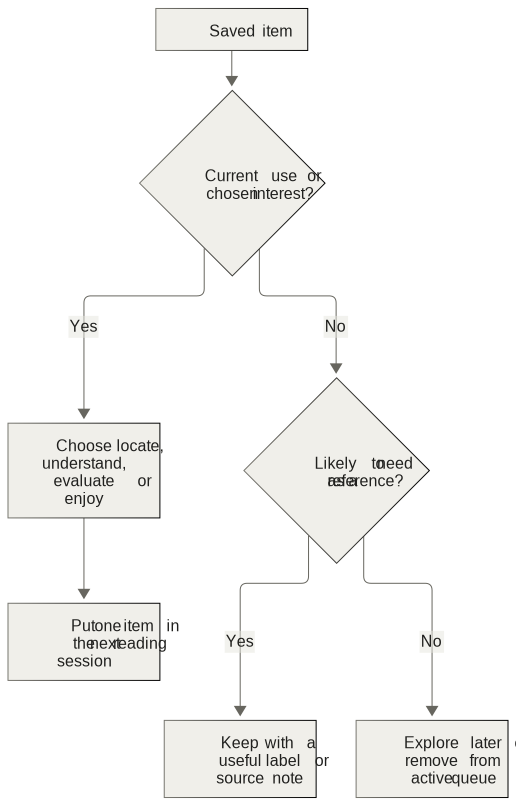
The diagram describes a manual sorting process. No particular app is required to run it.
Do not turn the active queue into another archive
Try starting with three items. Three is an example capacity limit, not a researched optimum. If each item is a dense report, even that may be too much. If the list contains short references, you may choose more.
When a new item arrives, compare it with the current queue. Does it replace something, support the same question or belong elsewhere? Avoid adding it automatically just because it is new.
For each chosen item, write a stopping point: a section, a question answered or a note completed. The reading and research time-block template can support this. A timer alone does not tell you whether the chosen reading was useful.
Where listening belongs
Audio is a way to work through selected material, not a reason to narrate the entire backlog. Try it on a substantial passage you have already decided matters. Keep charts, citations and technical details available for inspection.
Mira Reader connects speech to the visible words through synchronized highlighting. You can bring permitted text into the web Reader, but you still choose the source and decide what belongs in your queue. See the reading workflow and current beta access.
If choosing a saved-reading tool is the actual problem, the Readwise Reader alternatives guide covers that separate decision. For today, use the system you already have. Pick one active question, sort a small slice of your backlog and choose the next item deliberately.
Written by Merijn Raaijmakers, founder of Mira Reader.